


TikTok Ads Active But Not Spending? 8 Reasons and How to Fix Each One
28 July 2026

Written By Katja Orel
Lead Editor, UGC Marketing

Fact Checked By Sebastian Novin
Co-Founder & COO, Influee
Your TikTok ads show "Active" but aren't spending. No delivery, no impressions, budget untouched.
It's almost always one of eight things, and most you can fix in a few minutes. TikTok usually isn't rejecting your ads. The auction just isn't choosing them yet.
The one budget and bids can't fix is creative. A polished brand video can lose every auction to a phone-shot one, so that's the one to watch.

1. Budget is below TikTok's minimum threshold
TikTok won't spend if your budgets are below its published minimums. This is the most common cause for brands new to the platform, and the fastest to rule out.
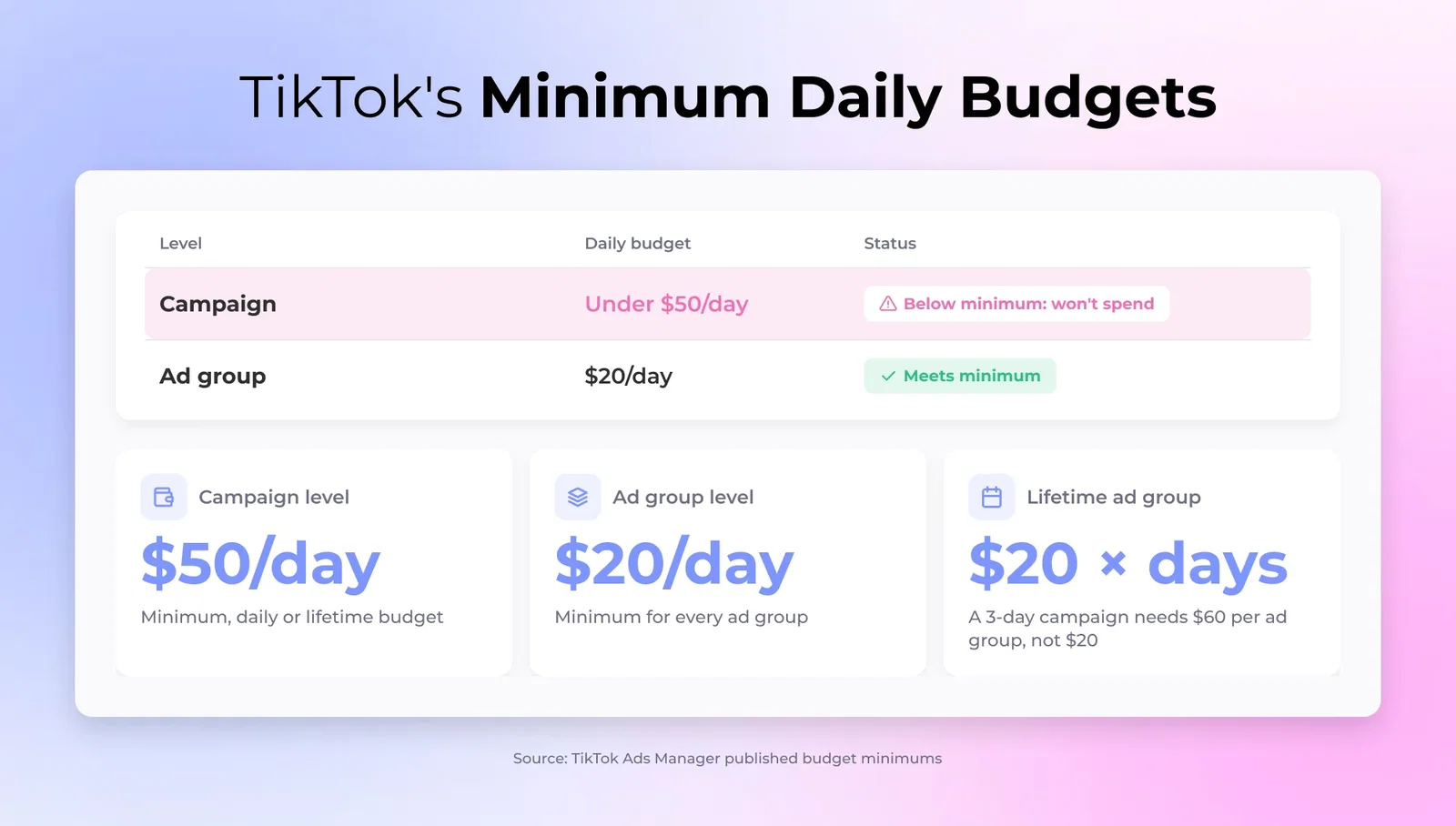
The minimums are fixed:
- Campaign level: $50/day minimum (daily or lifetime)
- Ad group level: $20/day minimum
Fix: open Ads Manager, go to Campaigns, and check the budget column at both levels. If either is under the minimum, raise it. Ads Manager flags budgets set too low before you publish, so if one slipped through, this is likely your answer.
One catch with lifetime budgets: at the ad group level, TikTok calculates the minimum as $20 times the number of scheduled days. A three-day campaign needs at least $60 in lifetime budget per ad group, not $20.
2. Ad scheduling is restricting delivery hours
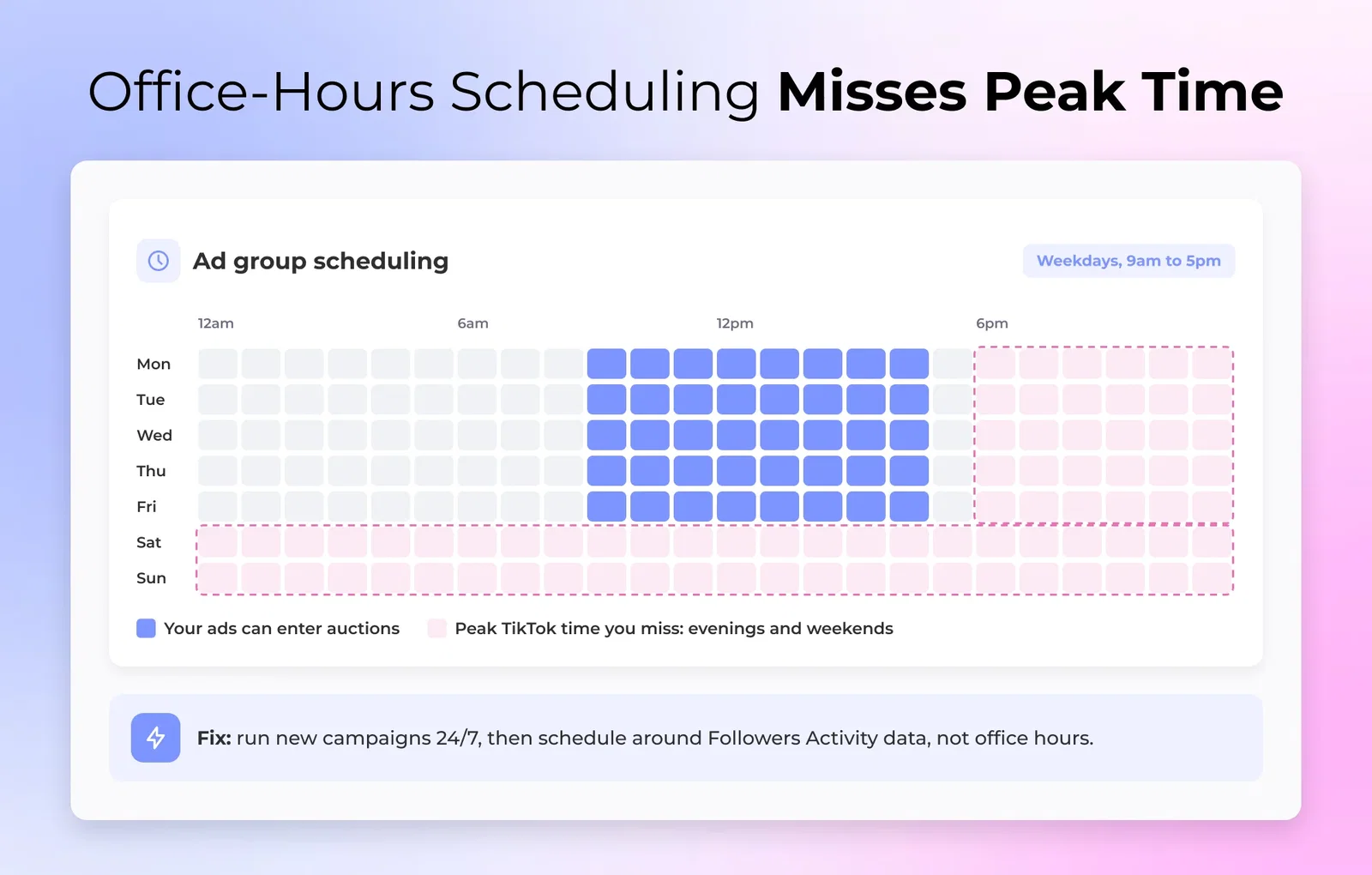
If you've set specific run hours, your ads only enter auctions during those windows. A schedule like 9am to 5pm on weekdays misses most of TikTok's peak hours, which are in the evenings and on weekends.
How to fix? Go to Ads Manager, open the ad group, and check scheduling. For a new campaign, run 24/7 first. Once you have data on when your audience is active (Followers Activity under Analytics), set the schedule around real performance instead of office hours.
3. Ad is still in review
TikTok reviews every ad before it runs, and it won't spend while an ad is "In Review" or "Pending." New accounts and first campaigns take longer, so this one catches a lot of first-time advertisers off guard.
How to fix? Check the ad's status in Ads Manager. If it's in review, give it 24 hours, occasionally 48. If it was rejected, the reason shows under the ad's status. Fix the flagged issue and resubmit.
Most first-campaign rejections come down to three things:
- Health claims without substantiation
- Before-and-after imagery
- A landing page that doesn't match the ad content

4. Creative quality is too low to win the auction
This is the cause most brands never check, because it doesn't look like a settings problem. Your budget is right, scheduling is open, the ad is approved, and spend is still near zero. The bottleneck is the creative itself.
TikTok's auction doesn't only read your bid. It weights predicted engagement rate, so an ad the system expects to underperform can't win auctions even with a high bid behind it. Two kinds of video lose here: an over-produced TV spot that reads as an ad, and a rough one with dark footage, muddy audio, or no clear hook. The algorithm deprioritises both before anyone sees them.
Run your creative through the native test:
- Does it feel like TikTok content, or like an ad?
- Do the first two seconds give a reason to keep watching?
- Is it well lit and easy to follow, with clear audio, whether voice, music, or trending sound?
- Is it filmed vertically (9:16)?
For DTC brands, this is where budget stops being the lever. Polished brand video consistently underperforms UGC ads on TikTok. A creator filming on their phone with a genuine hook wins more auctions than a studio product shoot, because the algorithm is pricing in the engagement each one is likely to earn. If your creative fails the native test, the fix isn't a higher bid, it's a better video.

The fix is to brief creators for native in-feed content instead of repurposing brand video. Give the creator a UGC brief template with four things spelled out: the problem your product solves, a strong hook, one clear value point, and a single CTA. Briefed this way, TikTok UGC reads as native and clears the auction's engagement bar. The TikTok ad examples that win almost all come down to nailing the first two seconds, so put the strongest hook up front and cut whatever delays it.
Side-by-side of a polished studio product video and a native phone-shot creator video, with the creator video winning the TikTok auction
5. Audience is too narrow or overlapping
Two different audience problems stall spend, and they show up at opposite ends of a brand's TikTok maturity.

UGC videos starting at A$60

5,000+ Vetted Creators in Australia
Too narrow: if your target audience is under roughly 500K users, TikTok may not have enough eligible impressions to spend your budget. DTC brands tend to over-narrow by stacking interest after interest until the pool is too small to serve.
How to fix? Broaden targeting. Cut the stacked interests, or switch to TikTok's Smart+ audience and let the algorithm find your buyers without manual interest selection.
Overlapping: once you're running several ad groups, they can end up targeting the same people and bidding against each other. That drives up your own costs and suppresses spend across both.
How to fix? Check Audience Overlap in Ads Manager under Tools, Audience Manager. If two ad groups overlap by more than 30%, merge them or add audience exclusions so each one reaches a distinct audience.

6. Campaign is in the learning phase
New campaigns and ad groups run through a learning phase while TikTok's algorithm works out who to show your ads to. Spend during this window is often slow or uneven, and that's the system working, not a fault. The learning phase needs roughly 20 to 50 conversion events to stabilise, usually about seven days.
How to fix? Wait, and stop touching it. Editing budgets, bids, targeting, or creative in the first seven days resets the phase. Slow early spend is normal learning behaviour, not a problem to solve.
If a campaign has run 7+ days with flat zero spend, that's your signal it isn't the learning phase. It's one of the other causes on this list.

7. Bid is too low to win auctions
If you're on a Cost Cap or Bid Cap strategy, your bid ceiling may be too low to win auctions in your target audience. TikTok deprioritises bids that keep losing to competitors, so delivery stalls.
How to fix? Switch to Maximum Delivery for now. It removes the ceiling and lets TikTok spend the full budget. Once you have conversion data and a baseline CPA, move back to Cost Cap set at or just above that number.
Don't launch a new campaign on Cost Cap. Start on Maximum Delivery, then switch once you have the data to set the cap from.

8. Payment or account issue
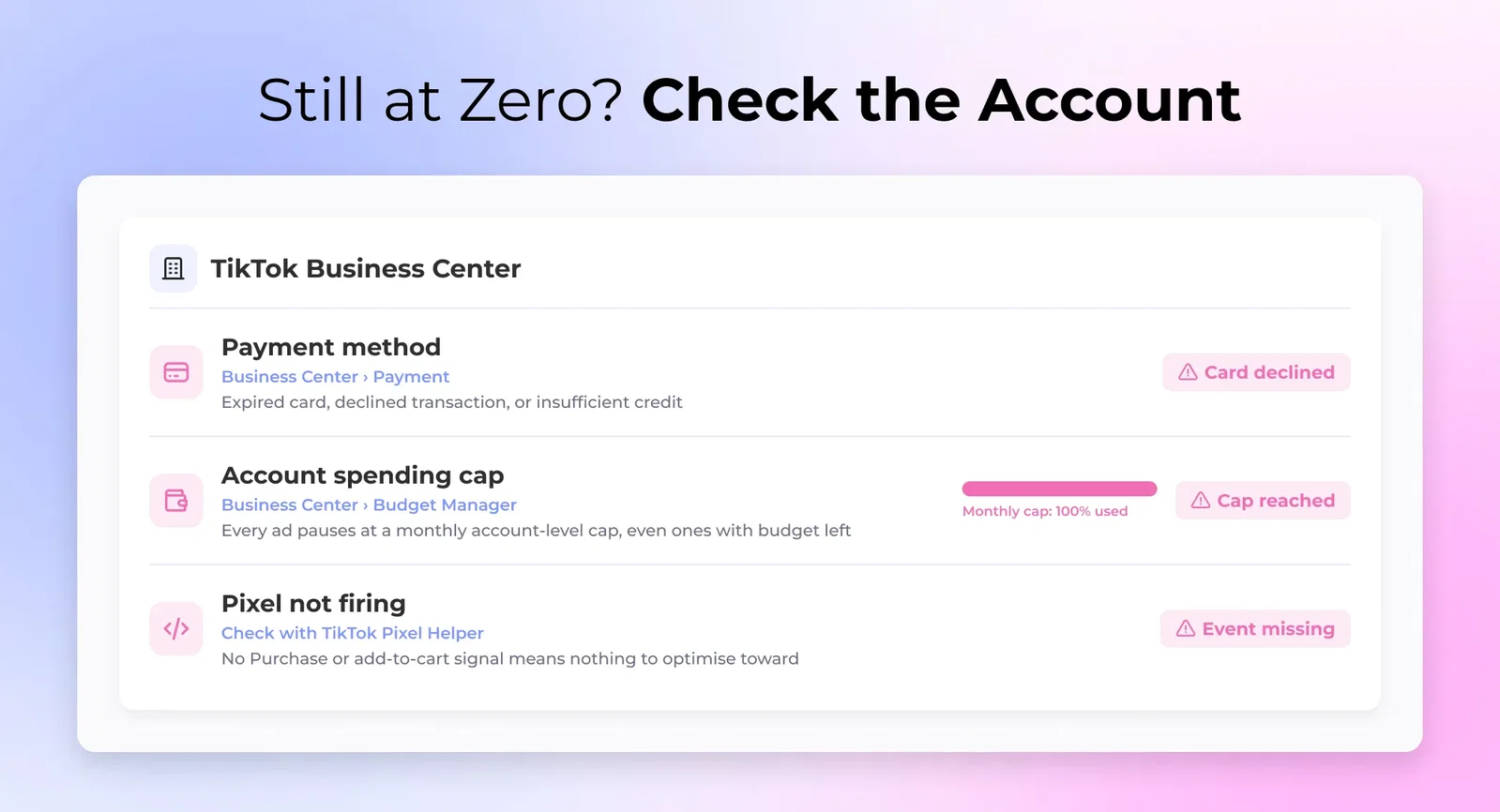
If everything above checks out and spend is still zero, the problem is usually the account, not the campaign. Three things to check:
- Payment method: an expired card, a declined transaction, or insufficient credit. Go to Business Center, Payment, and check the status.
- Account spending cap: Business Center, Budget Manager. Hit a monthly account-level cap and every ad pauses, even ones with budget left.
- Pixel not firing: if your campaign optimises for a conversion event like purchase or add-to-cart and your Pixel isn't firing that event, TikTok has no signal to optimise toward, and delivery stalls. TikTok Pixel Helper confirms whether events are firing correctly.
The TikTok ads not spending checklist
When spend drops to zero, work down this list in order. Most DTC brands find the answer in the first four.
- Budget at or above the minimums ($50/day campaign, $20/day ad group).
- Scheduling open, not boxed into narrow hours.
- Ad status is "Active," not "In Review" or "Rejected."
- Creative passes the native test: hook, sound, vertical, not polished brand video.
- Audience above ~500K, with no major overlap between ad groups.
- Campaign has run 7+ days, or is still completing the learning phase.
- Bid strategy is Maximum Delivery if new, or Cost Cap set at or above your historical CPA.
- Payment valid, no account spending cap hit, Pixel firing.
If you get to number four and realise the creative is the problem, that's the fix worth investing in. One produced video can't carry a whole account. It's the ad fatigue Facebook advertisers have fought for years, and TikTok is no different. Briefing a batch of creators for native content, then running the winners as Spark Ads, is what keeps the account spending.
UGC videos starting at A$60
5,000+ Vetted Creators in Australia
An influencer marketing platform handles the briefing, content rights, and Spark Ads setup in one place. Every video you put spend behind is then one you have full rights to reuse and scale.

FAQ
Why are my TikTok ads active but not spending?

TikTok ads can show Active but not spend when a setup detail blocks delivery: a budget under the minimum, a restrictive schedule, an ad still in review, or a payment issue. Check each level of the campaign in Ads Manager and match the status to the right fix.
How long does it take for TikTok ads to start spending?
TikTok ads usually start spending within 24 hours of approval. New accounts and campaigns in the learning phase can take longer to ramp, and slow early spend is normal rather than a fault. Consistent zero spend past 24 hours means it's time to troubleshoot.
What is the minimum budget for TikTok ads?
The minimum budget for TikTok ads is $50 per day at the campaign level and $20 per day at the ad group level. On lifetime budgets, the ad group minimum scales with the schedule, so a multi-day run needs proportionally more than a single day's floor.
Why are my TikTok ads spending slowly?
TikTok ads spend slowly most often because a campaign is still learning or the creative is winning few auctions. The learning phase produces uneven early spend by design. If the campaign is past its first week, weak creative or a narrow audience is the more likely cause.
Does creative quality affect TikTok ad delivery?
Creative quality directly affects TikTok ad delivery, because the auction weights predicted engagement alongside your bid. An ad the system expects to underperform wins fewer impressions even with budget behind it. Native, creator-style video clears that bar far more reliably than polished brand footage.
What happens if I edit my TikTok ads during the learning phase?
Editing your TikTok ads during the learning phase resets it, and delivery slows while the algorithm relearns. Budget, bid, targeting, and creative changes all count as significant edits. Leave a new campaign alone for its first seven days unless something is clearly broken.
Table of Contents

1. Budget is below TikTok's minimum threshold
2. Ad scheduling is restricting delivery hours
3. Ad is still in review
4. Creative quality is too low to win the auction
5. Audience is too narrow or overlapping
6. Campaign is in the learning phase
7. Bid is too low to win auctions
8. Payment or account issue
The TikTok ads not spending checklist
FAQ

Work with UGC creators from Australia
Australia

Sarah

Wahroonga

Hayley
Arundel

Johanna
Amaroo

Danica
Gold Coast