


TikTok Ads Not Converting? 8 Causes and How to Fix Each One
July 23, 2026

Written By Katja Orel
Lead Editor, UGC Marketing

Fact Checked By Sebastian Novin
Co-Founder & COO, Influee
TikTok ads not converting usually means one of three things: the ad isn't earning clicks, the clicks aren't turning into purchases, or the purchases are happening but aren't being tracked.
Each failure mode has different causes and different fixes. The wrong fix for the wrong problem burns more budget than doing nothing.
Work out which one you're in first, then go straight to that section. Treat this as a diagnostic, not a tutorial.

Failure mode 1: Getting views but no clicks
Views but no clicks is a creative problem. TikTok is serving the ad and people are watching, but almost nobody taps through.
If your 3-second video view rate is below 15% or your link CTR is consistently under 0.4%, the creative isn't earning attention. The TikTok ads benchmarks break CTR down by industry, so you can see where you stand.

Cause 1: The hook isn't stopping the scroll
TikTok users swipe within about two seconds if the opening doesn't earn attention. A 3-second video view rate below 15% means the hook is failing before the product gets a chance to convert.
The hook is the highest-leverage variable on CTR.
Fix: test 3 to 5 new hook angles instead of tweaking one video. Relatable frustration, a bold claim, an unexpected result, and comment-reply format are the four that most reliably outperform. Run them against each other and let the winner carry spend.
Cause 2: The creative looks like an ad
A polished brand video signals "advertisement" in the first frame, and TikTok users have trained themselves to scroll past it. Low CTR alongside a normal CPM is the tell: the format is being rejected, not the audience.
This is where UGC ads pull ahead. Phone-filmed, sound-on, native content consistently beats produced video on TikTok CTR because it doesn't read as a commercial. The best-performing TikTok ad examples all share this: creative that sits between organic posts and matches them.
Fix: brief creators for native, vertical, sound-on video. Running those posts as TikTok Spark Ads is the fastest path to ad creative that feels like content, because it puts spend behind a real creator post rather than a studio cut.

UGC videos starting at $85

10,000+ Vetted Creators in Canada
Failure mode 2: Getting clicks but no purchases
Clicks but no purchases is a post-click problem. The ad is doing its job; something between the tap and the checkout is losing the sale. Four causes cover almost all of it.
Cause 1: The landing page doesn't match the ad
This is the most common reason clicks don't turn into purchases. The ad showed something specific, a creator using the product, a discount, a result, and the click lands on a homepage or a broad collection page that doesn't reflect any of it. Visitors arrive expecting what the ad promised, don't find it, and leave.
Diagnose: click your own ad the way a customer would. Does the page show the exact thing the ad promised, above the fold, without scrolling or searching?
Fix: send every TikTok ad to a dedicated product or landing page that mirrors the ad's promise. No homepage redirects, no generic collections.
Cause 2: The landing page is too slow on mobile
TikTok traffic runs 94 to 98% mobile. A page that takes more than three seconds to load sheds a real share of clicks before it even renders, so the CTR looks fine while CVR stays near zero.
Diagnose: run your landing page through PageSpeed Insights on mobile. Anything above three seconds is costing you conversions.
Fix: compress images, cut redirects, and consider a lightweight page built just for TikTok traffic rather than a heavy main-store template.

Cause 3: The campaign is still in the learning phase
TikTok's algorithm needs roughly 20 to 50 conversion events to exit the learning phase and start optimising delivery toward buyers. Spend is uneven and CPA is high during this window. That's expected behaviour, not a failing campaign.
Diagnose: check how long the campaign has run and how many conversions it has. Under 20 conversions in the first seven days means it's still learning.
Fix: wait, and don't touch it. Every significant edit resets the phase. If the campaign has run seven or more days with zero conversions and the Pixel is confirmed firing, then it isn't a learning-phase issue, and you move on to the next cause. That Pixel check is the step most brands skip, waiting a week for a campaign that was never tracking in the first place.
Cause 4: The campaign objective is wrong
Running a Traffic campaign when the goal is purchases tells TikTok to find people likely to click, not people likely to buy. CVR stays low because the audience was never purchase-intent to begin with.
Diagnose: check the objective in Ads Manager. If it's Traffic or Video Views and you want sales, that's the problem.
Fix: switch to a Sales campaign optimising for the Purchase conversion event. This tells TikTok to find buyers instead of clickers. Note that the switch resets the learning phase, so give it another week to stabilise.
Side-by-side TikTok ad and landing page showing a mismatch, next to a Sales-versus-Traffic campaign objective toggle
Failure mode 3: Getting purchases but they're not showing in Ads Manager
Before assuming the campaign failed, check whether the sales are already happening and simply aren't being counted. Plenty of brands optimise a campaign that's actually working because Ads Manager shows zero while their store shows revenue. Two causes explain almost all of it.
Cause 1: The TikTok Pixel isn't firing
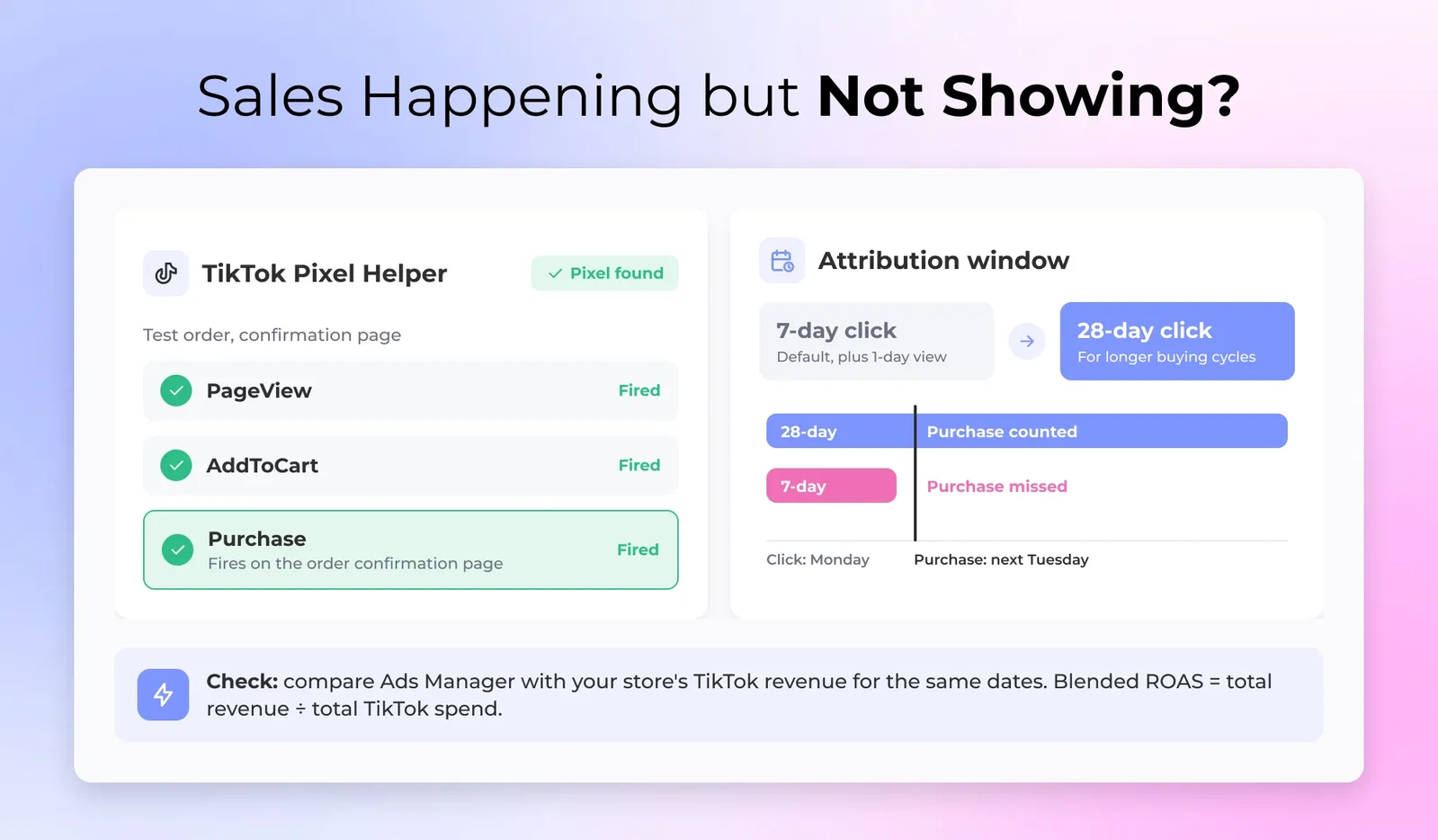
If the Pixel is installed wrong or the Purchase event was never set up, TikTok can't see conversions even when they're happening. The campaign reads as zero conversions while your Shopify dashboard shows the sales.
UGC videos starting at $85
10,000+ Vetted Creators in Canada
Diagnose: install the TikTok Pixel Helper Chrome extension, place a test order, and watch whether the Purchase event fires on the confirmation page.
Fix: if it isn't firing, reinstall the Pixel through TikTok's Shopify integration or add the code to your thank-you page manually. Verify every event in TikTok Events Manager before you run another conversion campaign.
Cause 2: The attribution window doesn't match your buying cycle
TikTok's default window is 7-day click, 1-day view. A customer who clicks on Monday and buys the following Tuesday won't be attributed, which hits higher-consideration products with longer purchase cycles hardest.
Diagnose: compare TikTok-reported conversions against your store's revenue from TikTok traffic over the same period. If the store shows meaningfully more than Ads Manager, the window is the issue.
Fix: extend the attribution window to 28-day click if your cycle runs longer than a week. Check blended ROAS, total revenue divided by total TikTok spend, as a sanity check against the platform-reported number.
The fast diagnostic checklist
Work through this in order. Someone in a hurry can run it in about two minutes, and most brands find the answer before the halfway point.

- TikTok Pixel installed and the Purchase event firing? Confirm with Pixel Helper before anything else. A campaign that isn't tracking makes every check below meaningless.
- Attribution window matched to your buying cycle? If your store shows more TikTok revenue than Ads Manager, the sales are real but counted late. Widen 7-day to 28-day click before you touch the campaign.
- Objective set to Sales, not Traffic or Video Views? A Traffic objective finds clickers, not buyers. Fix this before anything downstream.
- Campaign run seven or more days with 20-plus conversions? If not, let the learning phase finish. Editing now resets it and makes delivery worse.
- 3-second video view rate above 15%? Below that, the hook is losing the click before the product is seen. Test new angles.
- Creative native, or a polished brand video? Polished reads as an ad and gets scrolled past. Test creator content or Spark Ads.
- Landing page matches the ad's specific promise? Click your own ad as a customer. The page should show exactly what the ad promised, above the fold.
- Landing page loads in under three seconds on mobile? Test it in PageSpeed Insights. TikTok traffic runs about 95% mobile.
If your spend was moving but nothing converted, this is a different problem from ads that never delivered at all. When the spend itself never moves, TikTok ads not spending walks through that diagnostic instead.
Most conversion problems trace back to two things: creative that doesn't earn the click, and a post-click experience that doesn't deliver on it. An influencer marketing platform handles the briefing, content rights, and Spark Ads setup in one place, so the ad that earns the click and the page it sends people to are pulling in the same direction.
UGC videos starting at $85
10,000+ Vetted Creators in Canada
FAQ
Why are my TikTok ads not converting?

TikTok ads stop converting for one of three reasons: the creative isn't earning clicks, the landing page or campaign setup is losing the sale after the click, or the sale is happening but the Pixel isn't tracking it. Identify which of the three you're in, then match it to the fix. Running the wrong fix on the wrong failure mode wastes the most budget.
Why do I get clicks on TikTok ads but no sales?
Clicks without sales point to a post-click problem, most often a landing page that doesn't match what the ad promised. A slow mobile page, an unfinished learning phase, or a Traffic objective instead of a Sales objective are the next places to look. Click your own ad as a customer and you'll usually spot it fast.
How long does it take for TikTok ads to start converting?
TikTok ads typically need seven days and 20 to 50 conversion events to exit the learning phase and optimise toward buyers. Spend is uneven and CPA runs high in that window, which is normal. Judge conversion performance after the phase completes, not during it.
What is the TikTok ads learning phase?
The TikTok ads learning phase is the period when the algorithm gathers conversion data to work out who to show your ads to. It needs roughly 20 to 50 conversion events, usually about a week, and any significant edit during it resets the clock. Leave the campaign alone until it stabilises.
How do I check if my TikTok Pixel is working?
You check your TikTok Pixel with the TikTok Pixel Helper Chrome extension: place a test order and confirm the Purchase event fires on the confirmation page. Cross-check the events in TikTok Events Manager. A campaign showing zero conversions while your store shows sales almost always has a Pixel that isn't firing.
Why does TikTok Ads Manager show fewer conversions than my store?
Two things cause it. If Ads Manager shows zero while your store shows TikTok sales, the Pixel's Purchase event isn't firing. If it shows fewer but not zero, the attribution window is too short: TikTok's default 7-day click misses buyers with a longer consideration cycle. Compare Ads Manager against your store's TikTok revenue for the same dates, then extend to 28-day click if the gap is real.
Why are my TikTok ads getting views but no clicks?
Views without clicks means the creative isn't earning attention, usually a weak hook or a video that looks too much like an ad. A 3-second view rate under 15% points to the hook; low CTR with a normal CPM points to the format. Native, creator-style video fixes both more reliably than a polished brand cut.
Table of Contents

Failure mode 1: Getting views but no clicks
Failure mode 2: Getting clicks but no purchases
Failure mode 3: Getting purchases but they're not showing in Ads Manager
The fast diagnostic checklist
FAQ

Work with UGC creators from Canada
Canada

Janica Mae

North York

Jen
Calgary

Sarah
Brantford

Chris
Medicine Hat