


Meta Campaign Objectives: All 6 ODAX Goals and Which to Pick (2026)
12 August 2026

Written By Katja Orel
Lead Editor, UGC Marketing

Fact Checked By Sebastian Novin
Co-Founder & COO, Influee
You open Meta Ads Manager to build a new campaign and the objective you used to run isn't in the list. There's no Conversions option anymore, and no Catalog Sales or Brand Awareness either.
Meta cut its original 11 campaign objectives down to 6 across 2022 and 2023 under a framework called ODAX. The outcomes you can buy are the same ones, but the names changed and so did the logic for choosing between them.
Here's what each of the 6 objectives optimizes for, which one a DTC store should be running at its current spend level, and the objective mistake that wastes the most budget.

The 6 Meta campaign objectives: what each one does
The objective you pick decides who Meta shows your ad to. Two campaigns with identical targeting, budget, and creative will reach completely different people if one runs Traffic and the other runs Sales.
Awareness
Awareness optimizes for reach and brand recall. Meta serves the ad to people most likely to remember it, scored on estimated ad recall lift rather than any click or purchase.
There's no conversion location on this objective, so nothing that happens on your site feeds back into delivery. Use it for launches into cold audiences or seasonal pushes you plan to retarget later.
Traffic
Traffic optimizes for link clicks or landing page views. Meta finds the people most likely to tap, which is a different population from the people most likely to buy.
Its real job for a DTC brand is filling the Pixel with ViewContent and Add to Cart events cheaply enough to build a retargeting pool.
Set the optimization goal to Landing Page Views rather than Link Clicks. Link clicks count taps that bounce before your page finishes loading.
Engagement
Engagement optimizes for post interactions, video views, or page follows. The tactical use is social proof.
Run a small Engagement budget behind a new ad and let it collect likes and comments on the post ID.
Then pull that same post into your Sales campaign with the "use existing post" option, so the ad arrives with visible engagement under it. Upload the creative fresh instead and the proof doesn't carry over.
Partnership Ads work the same way from a creator's handle, so the ad runs under their name with their engagement attached to it.

Leads
Leads optimizes for form submissions, calls, or messages. Meta looks for people likely to complete an Instant Form.
It's the right objective for building an email list ahead of a launch and the wrong one for selling a product, because a form fill tells the algorithm nothing about who actually buys.
App Promotion
App Promotion optimizes for app installs and in-app events. Skip it if you don't have an app.
If you run both an app and a store, keep app campaigns separate from web Sales campaigns so the two aren't bidding against each other for the same users.
Sales
Sales optimizes for conversion events: purchases, add-to-carts, checkouts, sign-ups. Meta reads your Pixel and Conversions API data and hunts for people who resemble the ones who already converted.
This is the objective most DTC budget should sit on, once the Pixel is firing purchases and you're getting at least 50 of them a week.
Catalog Sales is gone as a standalone choice. To run Dynamic Product Ads now, pick Sales and connect your product catalog at the ad set level.
What Meta optimizes for | Legacy equivalent | |
|---|---|---|
Awareness | Reach and ad recall | Brand Awareness + Reach |
Traffic | Link clicks or landing page views | Traffic |
Engagement | Post interactions, video views, page follows | Engagement + Video Views + Page Likes |
Leads | Form submissions, calls, messages | Lead Generation + Messages |
App Promotion | App installs and in-app events | App Installs |
Sales | Purchases, add-to-carts, checkouts | Conversions + Catalog Sales |
Which Meta objective to use for DTC ecommerce
Almost every DTC brand belongs on Sales. Two things decide the setup: whether your Pixel is recording purchases yet, and how many purchases a week you're getting.
Everything below assumes a dedicated test budget of $50 a day.
No Pixel data yet
Run Traffic, and get the tracking right before you touch Sales. Install the Pixel and the Conversions API first.
Then open Events Manager, turn on Test Events, and place a real order on your own store. Check that Purchase arrives with a value and a currency attached.
A Purchase event that fires without a value is the single most common reason a Sales campaign never optimizes.
Give Traffic two to four weeks to build a base of ViewContent and Add to Cart events, then move to Sales once Purchase records consistently.
Pixel live, under 50 purchases a week
Run Sales, but set the ad set to optimize for Add to Cart or Initiate Checkout instead of Purchase.
You're still on the Sales objective, so Meta is still hunting for buyers. It's just learning from add-to-carts, and you get far more of those a week than purchases.
Move the optimization goal up to Purchase once purchases clear 50 events per ad set per week.
This workaround has a cost worth knowing about. Meta optimizes toward people who add to cart, and a share of them never check out.
So your cost per add-to-cart drops nicely while your cost per purchase barely moves, which looks like progress in the wrong column.
It's still the right trade under 50 purchases a week, because the alternative is an ad set stuck in Learning Limited.

Pixel live, 50+ purchases a week
Run Sales with Purchase as the conversion event and leave the settings alone. You have the volume Meta needs, so let it optimize.
The only change worth making from here is turning on value optimization.
New product or cold audience
Run two campaigns in sequence rather than one. Start with Awareness or Traffic so people see the product and land on the page.
Once you have video viewers and site visitors to work with, launch a Sales campaign aimed at those audiences. A cold Sales campaign on a product nobody has bought yet gives Meta nothing to pattern-match against.
Objective | Optimization goal | |
|---|---|---|
New account, no Pixel data | Traffic | Landing page views |
Pixel live, under 50 purchases/week | Sales | Add to Cart |
Pixel live, 50+ purchases/week | Sales | Purchase |
New product launch, cold audience | Awareness → Traffic → Sales | Sequential |
Retargeting a warm audience | Sales | Purchase |
Email or lead capture | Leads | Lead form |

UGC videos starting at 64 €

1,000+ Vetted Creators in Ireland
The objective mistake that wastes the most DTC budget
Three mistakes account for most of the wasted spend, and all three are made before the campaign ever goes live.
Mistake 1: Running Traffic when you want purchases
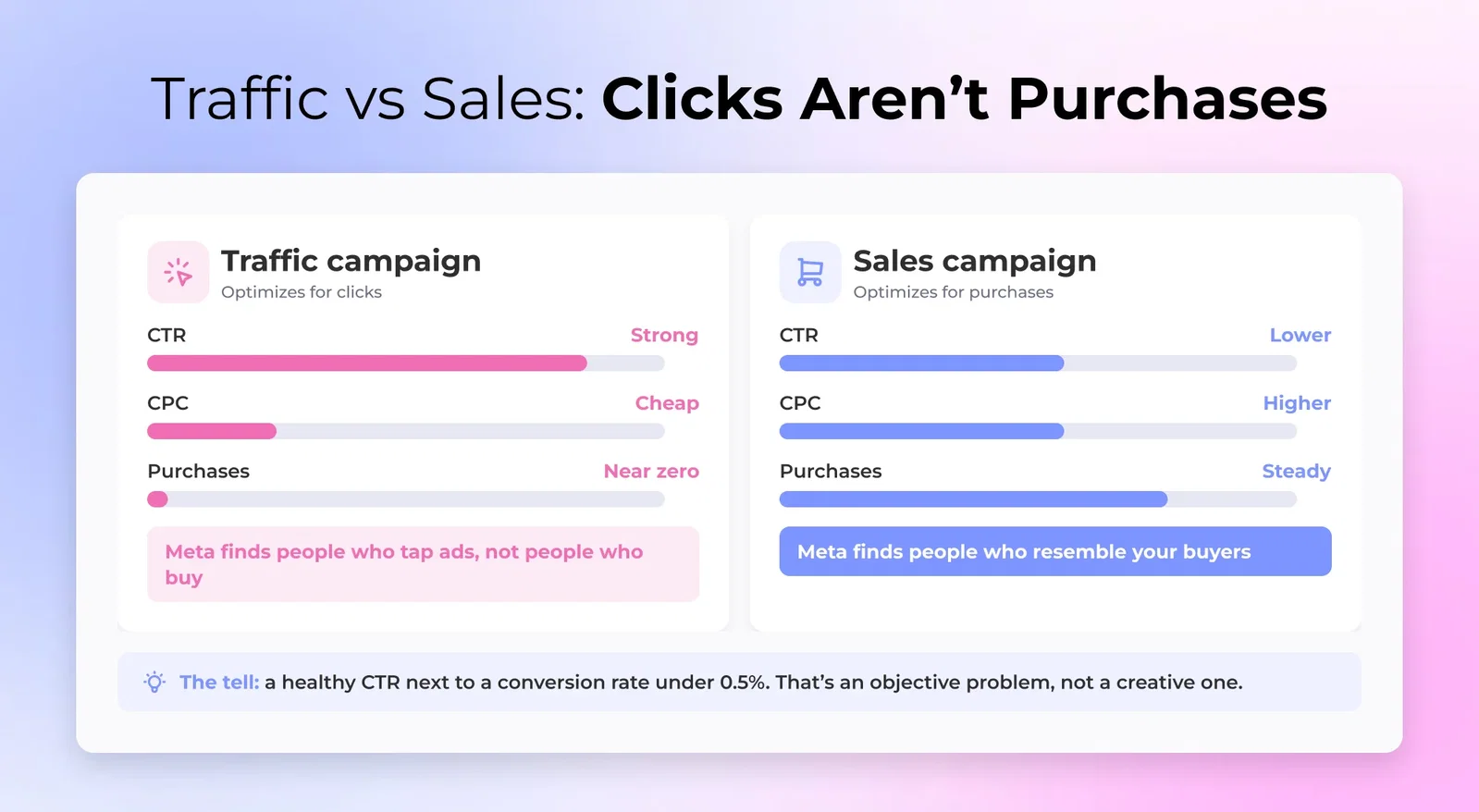
Traffic optimizes for clicks. Meta finds people who tap ads, and tapping ads is a habit that correlates poorly with buying.
Your click-through rate looks strong, your CPC looks cheap, and purchase volume stays near zero.
The tell is a healthy CTR next to a conversion rate under 0.5%. That's an objective problem, not a creative problem and not an audience problem.
The number that settles it is cost per purchase. If it's far outside the average CPA Facebook ads range for your vertical, running Traffic is what's causing it.
Build the campaign again on Sales, with the Pixel confirmed firing purchases.

Mistake 2: Running Sales before you have Pixel data
A Sales campaign on a fresh Pixel has no conversion history to learn from.
Meta needs to see who bought before it can find more people like them. Expect two to four weeks of volatile delivery while it works that out.
Most brands turn it off in week two, right before delivery would have settled down. Relaunching later starts the learning phase over from zero, so you pay for those two weeks twice.
If the delivery column reads "Learning Limited," that's Meta saying the ad set can't reach 50 events at its current budget. Those symptoms overlap heavily with the problem of Facebook ads running but not spending, so rule that out before you blame the objective.
Mistake 3: Trying to change the objective mid-campaign
The objective is locked at campaign creation. There is no dropdown to change it on a live campaign.
Switching from Traffic to Sales means duplicating the campaign and rebuilding it, and the duplicate starts learning from zero.
The same applies to edits inside a running campaign. Budget changes over roughly 20%, new creative, a new optimization goal, and audience edits all reset the learning phase.
Batch your changes into one edit a week instead of tuning daily. Pick the objective before you launch, not after.
UGC videos starting at 64 €
1,000+ Vetted Creators in Ireland
ODAX: what changed and what it means for your account
In 2022 and 2023, Meta replaced its 11 campaign objectives with 6 under ODAX, short for Outcome-Driven Ad Experiences.
The old names are gone from the campaign creation picker entirely. That's why a returning advertiser can't find the campaign type they used to run.
Where each one went:
- Brand Awareness + Reach → Awareness
- Traffic → Traffic, unchanged
- Engagement + Video Views + Page Likes → Engagement
- Lead Generation + Messages → Leads
- App Installs → App Promotion
- Conversions + Catalog Sales → Sales
Store Traffic is the one that didn't survive. It has no like-for-like replacement in the picker, so brands driving footfall handle it through location targeting and ad set settings rather than a dedicated objective.
The choices that used to happen at objective level now happen one level down, at the ad set, through conversion location and optimization goal.
Picking Catalog Sales in 2021 is picking Sales plus a catalog at the ad set in 2026. Same logic, different place in the interface.

Sales objective setup: the details DTC brands need
Sales is where most DTC budget goes, and four settings inside it decide whether it works.
Conversion location
Conversion location is where you want the conversion to happen: Website, App, Messaging apps, Calls, or Instant Forms. Website is the answer for a store.
Connect the Pixel and the Conversions API together. Browser-side tracking alone loses a meaningful share of events to iOS and ad blockers, and missing events distort every one of the Facebook ad metrics you report on.
Optimization goal
Optimization goal is the specific event you're chasing inside that location: Purchase, Add to Cart, Initiate Checkout, or View Content.
Pick the highest-intent event that clears 50 completions a week per ad set. Run the number before you commit to Purchase.
Median CPA for ecommerce accounts is $38.19 in the current Facebook ads benchmarks. A $50/day budget produces about 1.3 purchases a day, roughly 9 a week.
Reaching 50 at that CPA takes around $273 a day in a single ad set. Most brands testing Meta are nowhere near that, which is why Add to Cart stays the working optimization goal for a long stretch of the ramp.

Value optimization
Value optimization becomes available at 50+ purchases a week with purchase values passed through the Pixel. It tells Meta to chase total revenue rather than conversion count, which usually means fewer orders at a higher average order value.
Once it's on, judge the campaign on ROAS instead of CPA. Cost per purchase goes up by design here, so check your number against good ROAS Facebook ads rather than your old CPA target.

Advantage+ Sales campaigns
Advantage+ Sales campaigns, previously called Advantage+ Shopping, are a campaign type inside the Sales objective rather than a seventh objective.
Meta takes over most of the targeting and delivery decisions, and you feed it a creative bank instead of individual ad sets. It's now the default campaign type when you select Sales, which catches out brands expecting to configure everything manually.
Advantage+ works when you have proven creative and steady purchase volume. It struggles on a new account, because handing more decisions to an algorithm with no data doesn't produce better decisions.
Creative volume is what it runs on. Advantage+ tests dozens of assets at once, so brands running it source from a UGC platform rather than shooting a handful in-house.
Without that pipeline it recycles the same three UGC ads and fatigue sets in fast.
UGC videos starting at 64 €
1,000+ Vetted Creators in Ireland
FAQ
What are the Meta campaign objectives?

The Meta campaign objectives are Awareness, Traffic, Engagement, Leads, App Promotion, and Sales. You pick one as the first step of building a campaign, and Meta optimizes delivery around it from there.
What happened to the Conversions objective on Facebook?
The Conversions objective is now part of Sales. Everything it used to do still works. You just choose it at the ad set through conversion location and optimization goal instead of at campaign level.
What is the best Meta campaign objective for ecommerce?
The best Meta campaign objective for ecommerce is Sales, as long as your Pixel is firing purchase events. If it isn't, run Traffic for a few weeks first so the Pixel has something to learn from.
Can I change my Meta campaign objective after launch?
You cannot change a Meta campaign objective after launch. To switch, duplicate the campaign and pick the new objective. The copy starts its learning phase from zero.
How many conversions do I need for the Sales objective to work?
The Sales objective needs 50 conversion events per ad set per week. Below that the ad set stays in Learning Limited, where delivery is unstable and your results swing from week to week.
What is the difference between Traffic and Sales objectives?
Traffic finds people likely to click your ad. Sales finds people likely to buy once they reach your site. Those two groups overlap far less than most advertisers expect.
What is ODAX in Meta ads?
ODAX stands for Outcome-Driven Ad Experiences, the framework Meta introduced in 2022 to cut 11 campaign objectives down to 6. It also moved several decisions out of the campaign level and into the ad set.
Table of Contents

The 6 Meta campaign objectives: what each one does
Which Meta objective to use for DTC ecommerce
The objective mistake that wastes the most DTC budget
ODAX: what changed and what it means for your account
Sales objective setup: the details DTC brands need
FAQ

Work with UGC creators from Ireland
Ireland

Thea

Limerick

Martina
Dublin

Lana
Tralee

Allie
Dublin